English

COMPARE
English

Direct comparison

OneKey Neo vs OneKey Pro 2

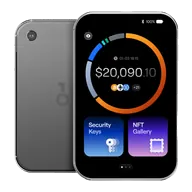
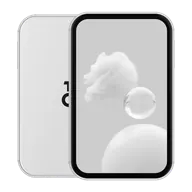
OneKey Neo vs Pro 2: same 3.54-inch AMOLED and safeOS 2. Neo (€159) without camera QR, fingerprint and Find My, with two instead of four secure elements; Pro 2 for €269.

Updated

AdvertisingThe “To the offer” buttons are paid partner links. If you sign up through them, JMRKT may receive a commission. Selection and presentation do not depend on it.

What matters

Key differences to help you choose, without an overall score.

  1. OneKey Neo

    • If you want to use the large AMOLED touch display for daily confirmations via Bluetooth or USB-C and do not need QR signing.
    • If you deliberately set up BIP39 or SLIP39 and want to consider the SeedCard separately as an optional backup method.
  2. OneKey Pro 2

    • If you want to review multi-chain transactions on an AMOLED touchscreen and optionally sign through QR codes.
    • If you want to set up BIP39 or SLIP39 deliberately and consider SeedCard as an additional backup route.

Features

Differences2

Shared features11

Overview

Conclusion — Strengths, limitations and suitable uses. Your workflow and the functions it requires are what matter.

Editorial assessment

OneKey Neo and Pro 2 are hardware wallets of the same generation. According to OneKey, they share the 3.54-inch AMOLED touch display, the safeOS 2 operating system and the OneKey app. The differences lie in the signing route, features and package contents. This comparison evaluates manufacturer documents only; JMRKT has not tested either device hands-on.

The most important difference is the camera. The Pro 2 can sign transactions by QR code without a cable or wireless connection (air gap). The Neo connects only via Bluetooth, USB-C and NFC. If you need QR signing, the Neo does not offer it; the Pro 2 or another QR device is the option for that.

On the hardware side, OneKey lists two secure elements with an EAL6+ rating for the Neo and four for the Pro 2. The Pro 2 also unlocks by fingerprint, and Apple Find My is announced there for a later update; the Neo relies on the PIN. Both devices list BIP39 phrases with 12 or 24 words, SLIP39 shares and the SeedCard. The number of chips is a manufacturer claim, not a security guarantee for the whole system.

In the OneKey shop, the Neo costs €159 and the Pro EUR 2269 (currency set to euro, as of 15 November 2026; in US dollars 179 and USD 299). According to the manufacturer, the Pro 2 includes a SeedCard, a folio case and six months of App Prime, while the Neo includes only the device, a recovery sheet and a cable. If you want to buy a SeedCard or case anyway, add the accessory prices. Only checkout shows whether taxes are included and when it will be delivered.

OneKey Neo · OneKey Pro 2 · Price and differences in the guide.
Compare alternatives

01

OneKey Neo

Pros

  • Same 3.54-inch AMOLED touch display and safeOS 2 as the Pro 2, according to the manufacturer
  • Bluetooth, USB-C and NFC; 700 mAh battery with wireless charging
  • BIP39 with 12/24 words and SLIP39 shares documented; SeedCard optional
  • Firmware and app open source according to OneKey, audits by SlowMist and Keylabs

Cons

  • No camera and therefore no QR signing (air gap), unlike the Pro 2
  • Two instead of four secure elements, no fingerprint sensor and no Apple Find My
  • SeedCard, case and charging pad not included; accessories cost extra
  • Offline TOTP and NFC touch authentication only announced for a later update

more suitable if...

  • If you want to use the large AMOLED touch display for daily confirmations via Bluetooth or USB-C and do not need QR signing.
  • If you deliberately set up BIP39 or SLIP39 and want to consider the SeedCard separately as an optional backup method.
02

OneKey Pro 2

Pros

  • 3.54-inch AMOLED touchscreen and fingerprint sensor according to the manufacturer
  • QR air-gap alongside USB-C and Bluetooth
  • BIP39, SLIP39 and additional SeedCard backup documented
  • Open firmware and app stack according to OneKey

Cons

  • Pre-order; check delivery timing and the final price at checkout
  • Find My, NFC passkeys and TOTP announced for future OTA updates
  • Support still describes portfolio sync as an upcoming feature
  • SeedCard is a manufacturer-specific backup method; check its PIN and compatibility

more suitable if...

  • If you want to review multi-chain transactions on an AMOLED touchscreen and optionally sign through QR codes.
  • If you want to set up BIP39 or SLIP39 deliberately and consider SeedCard as an additional backup route.

Sources & notes