English

COMPARE
English

Direct comparison

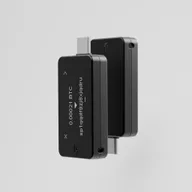
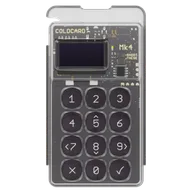
BitBox02 Multi vs Coldcard Mk4

Open source focused multi-coin device vs. Bitcoin/air gap focused device.

What matters

Key differences to help you choose, without an overall score.

  1. BitBox02 Multi

    • If you want to manage Bitcoin and Ethereum/ERC-20 through a wired BitBoxApp connection.
    • If open firmware and a microSD backup matter more to you than Bluetooth, iPhone signing or Solana.
  2. Coldcard Mk4

    • If you want to sign Bitcoin using PSBTs and microSD and learn a separate wallet workflow.
    • If you first check an existing device’s firmware and seed origin against Coinkite’s security advisory.

Features

Differences7

Shared features6

Overview

Conclusion — Strengths, limitations and suitable uses. Your workflow and the functions it requires are what matter.

01

BitBox02 Multi

Pros

  • Firmware and client designated as open source
  • Dual chip and CC-EAL6+ manufacturer information
  • microSD backup, BIP39 and Anti-Klepto documented
  • Desktop OS and Android supported

Cons

  • No air gap
  • No iOS and no Bluetooth
  • Solana not supported
  • Fewer chains supported than multiple multi-chain devices
  • No SLIP39

BitBox02 Multi is more suitable if...

  • If you want to manage Bitcoin and Ethereum/ERC-20 through a wired BitBoxApp connection.
  • If open firmware and a microSD backup matter more to you than Bluetooth, iPhone signing or Solana.
02

Coldcard Mk4

Pros

  • Air gap and PSBT workflows documented
  • Two Secure Elements according to the manufacturer's documentation
  • Limited to Bitcoin
  • NFC in addition to USB
  • Firmware code is publicly readable; its licence includes a Commons Clause restriction

Cons

  • Seeds generated by affected earlier firmware may be at risk; a firmware update does not repair existing seeds. Check Coinkite’s migration guidance.
  • No multi-chain support
  • No Bluetooth
  • Small monochrome display
  • PSBTs and separate wallet software require a deliberately configured workflow

Coldcard Mk4 is more suitable if...

  • If you want to sign Bitcoin using PSBTs and microSD and learn a separate wallet workflow.
  • If you first check an existing device’s firmware and seed origin against Coinkite’s security advisory.

Sources & notes