English

COMPARE
English

Direct comparison

Ledger Nano X vs OneKey Pro

Established Nano X (EUR 99, BT, monochrome) vs. OneKey Pro (touch, air-gap, open source firmware).

What matters

Key differences to help you choose, without an overall score.

  1. Ledger Nano X

    • If you want to sign with an iPhone or Android device over Bluetooth and use Ledger apps.
    • If you want a compact device with a battery and can work with buttons and a closed firmware core.
  2. OneKey Pro

    • If you want to check multi-chain transactions on a touchscreen and sign via QR codes when needed.
    • If open firmware matters to you and you deliberately plan for a larger device and several connection modes.

Features

Differences7

Shared features6

Overview

Conclusion — Strengths, limitations and suitable uses. Your workflow and the functions it requires are what matter.

Editorial assessment

Ledger Nano X and OneKey Pro are hardware wallets for mobile signing. The key difference is operation: Nano X combines a small screen with buttons, while OneKey Pro offers a touchscreen and an additional QR signing path. Bluetooth alone does not decide the choice because both devices support it.

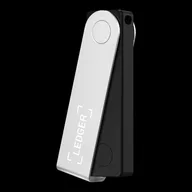
Ledger Nano X suits a compact Bluetooth setup for iPhone and Android. The trade-offs are its small screen, button controls and closed firmware core. It does not offer a QR air-gapped mode.

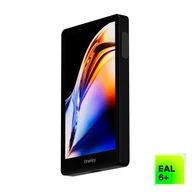
OneKey Pro suits touch controls and an optional QR workflow. Its firmware and client are open source; the larger body takes up more space. For QR signing, check the specific wallet app and asset. The number of security chips alone does not establish a security advantage.

The dataset lists EUR 99 for Nano X and USD 278 for OneKey Pro. Without a common exchange rate, taxes and shipping, these are not comparable final prices. Compare offers in the same currency, then consider whether you will actually use touch controls and QR signing.

01

Ledger Nano X

Pros

  • Bluetooth signing with iPhone and Android; USB on a computer
  • Compact device with its own screen and buttons
  • Multiple assets, including Solana, through compatible wallet apps

Cons

  • Small monochrome screen; no touch controls
  • Closed firmware core; client only partly open source
  • No QR air-gapped mode or NFC

more suitable if...

  • If you want to sign with an iPhone or Android device over Bluetooth and use Ledger apps.
  • If you want a compact device with a battery and can work with buttons and a closed firmware core.
02

OneKey Pro

Pros

  • Touchscreen for reviewing and confirming on the device
  • QR air-gapped signing as an additional path alongside USB and Bluetooth
  • Open-source firmware and client
  • Multi-chain support, including Solana, with compatible wallet apps

Cons

  • Larger form factor than the Nano X
  • SLIP39 supported on Pro since firmware 4.15.0; check the installed version
  • QR compatibility depends on the asset and wallet app used

more suitable if...

  • If you want to check multi-chain transactions on a touchscreen and sign via QR codes when needed.
  • If open firmware matters to you and you deliberately plan for a larger device and several connection modes.

Sources & notes