Hardware wallet lost or broken: what next?
Device missing, backup lost or passphrase forgotten? Find your next step with a decision aid, manufacturer links and an emergency checklist.
In this guide
Your hardware wallet is missing, its screen stays dark or you cannot remember its PIN. Losing a device does not automatically mean losing your coins. What matters is whether you can still use the affected wallet or have a complete, compatible recovery method.
First take a moment to identify the situation. A failed device, a missing backup and an exposed recovery phrase require different responses. This guide explains the prerequisites; entering a backup takes place only through your manufacturer's prescribed process. We have not personally tested recovery on every listed model.
Device
It enables access to your keys.
Backup
Format, completeness and passphrase matter.
First step
Preserve your remaining access.
First assess your situation
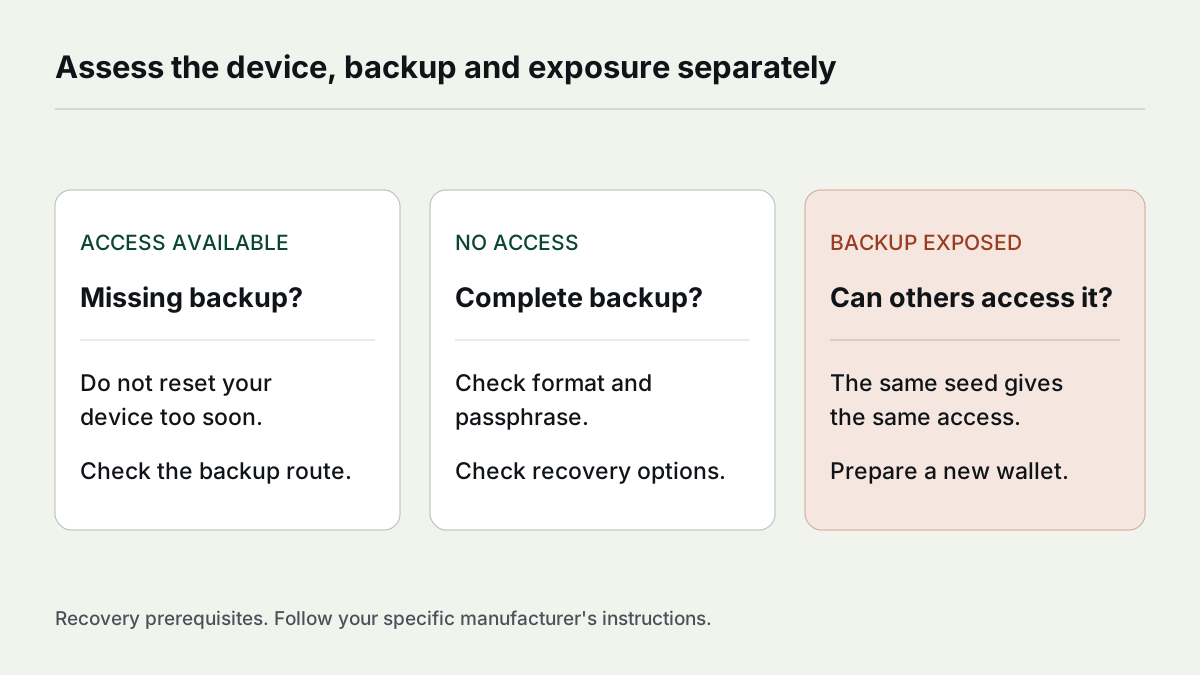
Here, access means you can open the affected wallet and sign transactions . A displayed balance in an app or watch-only wallet is not enough. Likewise, a recovery phrase is useful only if it belongs to the affected wallet and all additional required information is available.
Decision aid · no secrets requested
Which situation applies to you?
Select only your situation. Never enter recovery words, PINs, passphrases or private keys here.
This tool processes the selected situation only in your browser. It cannot verify a backup's authenticity or a device's compatibility.
| Your situation | Relevant section |
|---|---|
| Device lost or damaged, complete backup available | Restore on a compatible device |
| PIN forgotten, device still available | Reset only after confirming the recovery method |
| Backup missing, wallet still usable | Preserve remaining access |
| Someone else may know the backup | Prepare new key material |
| Additional passphrase forgotten | Check the passphrase separately |
| No access and no complete backup | Look for other backups and recognise recovery limits |
Device lost or damaged, backup available
For a seed-based wallet, the coins are not stored inside the device. The backup lets you derive the keys again and regain access to the associated accounts. Ledger explains device loss through this existing recovery process. Ledger on lost devices.
Preparing requires more than a brand name: which backup did you choose during setup? Did you use an additional passphrase? Which assets, networks and accounts belong to the wallet? Then open the instructions for the specific replacement device through the manufacturer's official website.
If the device was stolen or its loss is unexplained, also assess the risk of someone else gaining access. A PIN is a device protection feature. It is not a universal guarantee against every physical attack and does not replace a confidential backup. If third-party access is plausible, transferring to a new wallet may be necessary after recovery; see compromised backup and What a hardware wallet protects.
For a simple device failure without signs of disclosure, first check the documented recovery process. The replacement device must support your backup. A similar screen or the same connector does not establish compatibility.
Which backup supports which recovery method?
| Available backup | What to check before buying a replacement device |
|---|---|
| BIP39 word list | Supported word count, additional passphrase and required assets/accounts |
| SLIP39 backup | Explicit SLIP39 support and enough valid shares to meet the chosen threshold |
| BitBox microSD backup | Prescribed recovery through BitBoxApp and a compatible BitBox device |
| Backup cards in a card-based system | Which cards still work and which setup method was selected |
BIP39 and SLIP39 are different formats. A recovery phrase cannot be imported into every device based solely on its word count. An SLIP39 multi-share backup needs enough shares for the original configuration. In a simplified 2-of-3 example, two matching shares suffice; one does not. BIP39, SLIP39.
Trezor documents the formats supported by each device. Use that table when selecting a replacement Trezor. Trezor: backup formats.
BitBox02's official instructions describe recovery from a microSD backup. An optional passphrase is not included in that backup and must be available separately. For this process, insert the card into the designated device. BitBox: microSD recovery.
With Tangem, distinguish between having a usable backup card and having chosen a seed phrase during setup. A seedless wallet cannot simply be restored with a newly generated recovery phrase after all devices have been lost. Tangem: device loss and recovery.
The Hardware wallet comparison table helps narrow down documented backup methods. The final compatibility check belongs in the current manufacturer's instructions for the specific model.
PIN forgotten: why a reset should not be your first experiment
The device PIN and wallet backup have different roles. A PIN unlocks the device; the backup reconstructs key material. A reset may remove local access. If you then lack a complete backup, the reset may have discarded your last available way in.
Before resetting, check which instructions apply to your model, which backup is required and whether it is complete. Do not experiment with your only device while the recovery method is uncertain. A new device password after recovery does not create a new wallet. With BitBox, for example, setting a new device password is part of the documented recovery process. BitBox on recovery.
Backup missing, but you still have access
While you can still sign transactions, you have options. Preserve the device and access to the affected wallet. Check the official instructions to see whether you can create or display a valid backup. With a working BitBox02, creating a new microSD backup is a documented option. BitBox on setup and securing backups.
If someone else could have found the missing backup, also assess possible disclosure. Another copy of the same backup does not resolve that access risk. Trezor describes transferring funds to another wallet when backups are lost or potentially compromised. Trezor: wallet with a new backup.
Plan the sequence before intervening: check the new backup method, prepare the destination, verify addresses and decide what to do with the old device only after a confirmed transfer. Do not make resetting the device the starting point of your recovery plan.
Recovery phrase exposed: restoring it alone does not revoke access
If you entered the words on supposed support pages, sent them through chat or processed them on someone else's computer, the existing key material may be compromised. The same seed on a new device remains the same access credential. Changing your device PIN does not lock out someone with a complete backup.
In this situation, you need a new wallet with new key material and a new confidential backup, provided you still have access to the affected funds. Check the documented migration process and the secure destination address. Trezor's instructions explain the difference between restoring access and transferring funds. Trezor on migration.
A test transfer may reveal an incorrect destination or network; it cannot guarantee protection against a third party acting at the same time. Consider network fees and each asset's requirements. The technical steps depend on the wallet and network. A universal set of clicks for every brand would be unreliable.
Passphrase forgotten or wallet empty after recovery?
An additional passphrase is not another name for a PIN. It changes the wallet derived from the backup. With BIP39, a different passphrase can produce another valid wallet. An empty balance may therefore mean that you opened a different wallet. BIP39 on passphrases.
Check your own securely stored record, spelling and spaces using the manufacturer's prescribed process. With Trezor, a passphrase cannot be removed or reset by support. Trezor also lists disabled networks as a possible reason for an unexpectedly empty display. Trezor on passphrase wallets.
Do not hastily change your backup just because a new app initially shows no holdings. First check the asset, network and account using your previous records. Never upload recovery words or private keys to a supposed wallet scanner.
No access and no complete backup
Look specifically for other existing backups: another valid recovery phrase, enough SLIP39 shares, a suitable microSD backup or a usable backup card. Also check whether an additional passphrase is required. A balance, receiving address or transaction ID cannot replace the secret recovery credentials.
If all required credentials are missing, a new device alone cannot restore access. Someone promising guaranteed recovery regardless of those prerequisites and demanding your words or money upfront has not provided reliable evidence. Official manufacturer support can explain the process; it cannot simply replace missing key material through remote unlocking.
After the emergency: make your recovery method verifiable
After regaining access, document your recovery method, relevant accounts and intended recovery process for yourself. These organisational details help later without placing secrets in a general note. Then use the manufacturer's supported backup check.
Trezor stresses that support never asks for recovery words and that a backup must remain confidential. Trezor on secure backup handling. For a detailed plan, see Save seed phrase.
Emergency checklist: preserve access, identify the problem, act securely
Ticks apply to this page view and are not saved. Download the checklist for your own records.
Frequently asked questions about lost hardware wallets
Are my coins lost if my Ledger or Trezor is missing?
Must I use the same brand?
Can I have my recovery words checked here?
Does a new PIN help if my recovery phrase has been exposed?
Should I reset the device if the wallet appears empty?
Further reading: Understand backup methods, A hardware wallet's protection limits and Compare hardware wallets. Sources and compatibility were checked on 6 October 2026; the current instructions for your specific device remain the reference.