What Does a Hardware Wallet Protect? Risks & Limits
What a hardware wallet protects and which risks remain: understand keys, backups, address verification and smart-contract authorizations separately.
In this guide

A hardware wallet is designed to separate private keys from connected online software and support controlled transaction signing. This reduces certain risks from a compromised computer. It does not establish that an authorized recipient is correct or that a smart contract has the intended effect. Device protection, backup security and the review of each authorization need separate consideration.
A device does not automatically know your intention. A technically valid address may belong to the wrong recipient; a displayed contract may receive broader permissions than you intended. Support-message authenticity must also be checked outside the device. What matters is which information you can actually read and understand before confirming.
Key management, transaction verification and recovery each need a reliable process.
For each action, consider separately what the device protects and which decision you need to make using the information shown.
Protects
Key extraction from the PC, plain text in the browser.
Doesn't protect
Wrong address, seed photo, fake support.
Toughest test
Can you still explain the backup in five years?
Device protection and a trusted display
Signing locally means: The private key is used in the device. Malware on the laptop can distort the prepared transaction — it cannot read the key, if Firmware, display and confirmation work as the manufacturer describes.
That's why the display is part of the protection, not decoration. If you only read fields in the app and press “OK” on the device, the protection will be restored. Blind signing of contracts without plain text is the same pattern in Web3.
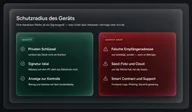
Risks outside key management
Typical chip task
- Do not export key as plain text
- Signature only after confirmation on the device
- PIN and any passphrase through the manufacturer’s intended process
Typical residual risks
- Recipient address swapped or inserted
- Seed photographed, placed in chat or cloud
- “Support” asks for words or remote access
Social engineering doesn't need a chip break. It takes time pressure, a credible interface and a person who confirms. The device does not undo the second step.
The backup question before purchasing
That's why there's more to the purchase decision than the data sheet: How is the backup created - seed phrase on paper, microSD, Shamir shares, card duplicate? Who can access it in an emergency? And: Do you understand the recovery path well enough to be able to execute it in five years?
Card formats without a classic display impose the same test: you must be able to explain the brand's recovery path before you insist on it. This isn't a mark against form — it's the same responsibility in a different case.
In detail: Backup and seed phrase. Basics: What is a Hardware Wallet?.
Check in the table
Backup procedures and open source status belong in the feature lines, not in a gut feeling. Unranked brands: The 4 hardware wallet brands at a glance.
Three separate protection tasks
Three things are often put into one sentence. They belong next to each other, not on top of each other.
The device holds the key and signs locally. Malware on the laptop should not read the plain text - if the display and confirmation work as the manufacturer describes. That's the task What is a Hardware Wallet?.
The backup enables access recovery. BIP39 may also require a passphrase. If all required information is exposed, another person may also recover the wallet under suitable conditions. Photographing or synchronizing a backup therefore creates an additional copy of confidential access information.
Further reading: Backup and seed phrase.
Phish does not need chip breakage or seed theft in the safe. It needs a credible surface and confirmation. Fake support, a foisted recipient address, a contract that the front end draws differently than the chip executes - the device sees the fields that it shows itself. It doesn't evaluate the story behind it.
Securely stored keys do not prevent a mistakenly authorized transaction. Likewise, correct address display does not protect an exposed backup. Identify which protection task is affected in each incident. Responding to phishing differs from responding to a lost device or a seed phrase that may have become known to someone else.
Which doesn't protect the device
Briefly the remaining list that does not include any secure element:
- An address that you type yourself or take from a chat. The display shows them. It doesn’t know if she’s “the right one.”
- A smart contract whose frontend asserts a different intent than the fields you blindly assert.
- A call or email asking for words, PIN or remote access. This doesn’t require real support — see the manufacturer documentation for Trezor, Ledger, BitBox and Tangem.
- Fire, water, loss of device and the backup. Cold storage without backup is a single point failure.
- Market, spread and counterparty on the exchange you are buying from. The device signs the payout. It doesn't act for you.
Card formats without a classic display do not change the list, they move the location of the confirmation. The same applies to air gap: the key stays cold, the decision remains yours.
In the table, you check backup and openness as columns, not as promises of protection. Unranked brands: The 4 hardware wallet brands at a glance.
Before use, review three organizational points: is the complete recovery path documented, is the required information accessible and can you independently understand the displayed transaction details? The secret itself does not belong in a general checklist. A clear description of the procedure and responsibilities is enough to identify potential gaps.
Manufacturer phishing guidance matters for the actual workflow: where information appears, which data official software requests and how to reach support through an official channel you opened yourself. A familiar-looking interface does not answer those questions. Review unexpected requests before authorizing further permissions or transactions.
Seed, device and phishing remain three layers. A Secure Element does not close any of the other two. If you photograph the words, you don't need a chip break. Anyone who confirms a chat address doesn't. The table shows Backup and Open as columns — Compare hardware wallets — not as a promise of protection. Basics: What is a Hardware Wallet?.
Questions before authorizing an action
What is being authorized: a payment, a contract interaction or permission for later access? Which details appear on the device and which only on the website? If the scope cannot be understood from the available information, that uncertainty is itself part of the decision.
Which backup would be needed after device loss? What would happen if someone found that backup instead? These answers describe different risks. A PIN can protect local device access, but it does not change keys that can be derived from a complete exposed backup.
Frequently asked questions
Does a Secure Element protect against phishing?
No. A chip can hold keys. He cannot tell whether the address on the display belongs to a fraud story.
Is open source automatically safer?
Openness makes testing possible, it does not replace it. The table says “yes”, “partially” or “no” - with the source, without laboratory evaluation by us.
Which backup mistake can be avoided?
Do not share backups in chats or store them in unprotected cloud files. Use the documented backup method and never give recovery words to supposed support staff. The device does not exclude people who have complete access information.