What Is a Hardware Wallet? Cold Storage Explained
How a hardware wallet manages keys and signs transactions, with a clear workflow, backup basics and the limitations of cold storage.
In this guide
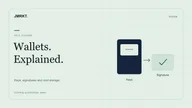
A hardware wallet is a device for managing cryptographic keys and signing transactions. Coins are recorded on their respective networks, rather than stored inside the device. The device is designed to separate sensitive keys from the connected computer or phone. Storage, confirmation and backup arrangements depend on the particular model.
This article is an explanation based on manufacturer documentation, open standards and our Methodology. He is none own practical test report and does not contain any invented laboratory tests.
task
Keep keys offline and signed locally.
Not the task
Evaluate addresses, contracts or calls.
Next step
Understand backup, then filter characteristics.
What the device does
Three separate tasks help explain the system: managing keys, presenting transaction details for review and signing an authorized transaction. Companion software connects to the network. For each model, check where keys are generated, which information appears on a trusted display and how access is restored after device loss. The overview describes typical workflows rather than a guarantee for every device architecture.
- It stores seeds and keys derived from them in a protected environment. Whether this is a secure element, open-source firmware or both is stated in the feature lines - not in the advertising.
- It shows the amount, recipient and often the contract on the Device display. Whatever you confirm there will be signed.
- It talks to a companion (desktop, mobile, sometimes just QR or microSD). The connection transports data, not the private key.
Whether Bluetooth, touch display or air gap make sense depends on the usage profile. That belongs in the Buying criteria, not a blanket “best wallet” statement.
A transaction in four steps
An ordinary payment can be divided into four steps. The fields available for review depend on the network, transaction and device. Complex smart-contract calls may be displayed incompletely or be difficult to interpret. A confirmation dialog alone does not establish that you could review every consequence. USB, Bluetooth or QR connections do not change that underlying question.
- The software on the computer or cell phone creates a transaction.
- The device shows the relevant fields. You check them on the device, not just in the browser.
- After confirmation, the device signs through its intended process. The signed result is transferred to the companion software.
- Only then can the software send the transaction to the network.
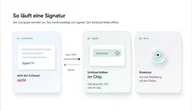
Why the display matters: An infected computer can suggest a different recipient address than what is shown on the screen. The device only knows what it draws itself. Therefore, “blind signing” — acknowledging without readable fields — is a different risk than cold storage itself.
What a hardware wallet is not
- No investment advice and no promise of “unhackable”.
- It does not replace a seed-phrase backup. If the last usable access method fails and the complete recovery route is missing, access can be permanently lost. Details: Backup and seed phrase.
- No softwallet replacement for constant online signing. Anyone who moves small amounts several times a day often also uses a hot wallet - with the clear difference that the key is connected to the network.
- No protection against an address that you confirm incorrectly yourself. The device does not check whether the recipient is “the right one”. For this: What a hardware wallet really protects.
Cold storage means: the key is cold. The decision remains warm — yours.
Connection and everyday life
USB is the most common entry point. Bluetooth and NFC save cables, but expand the attack surface to include radio. Air gap (QR, microSD, PSBT) keeps the device in everyday life without a permanent data connection; the price is a longer expiry.
These features alone do not establish that a device is safer. They change where you can make mistakes: pull the cable, confirm pairing, scan QR, save backup. The Comparison table lists the paths per model with source.
Distinguish cold storage, backups and companion software
Cold storage is a Condition: The private key does not have a permanent network connection. A hardware wallet is a Device, which is intended to maintain this state. The two words are often used synonymously. They are not.
An offline word list is initially a backup. It does not establish that the associated keys have never been used on a network-connected device. Cold-storage assessment depends on how keys are handled throughout their use. A hardware wallet can help, but recovery, additional software and authorized transactions also matter. Backups and operating practices serve different purposes.
Further reading: Backup and seed phrase.
A hardware wallet enables signing in a separate device environment. Models with displays can provide additional verification of the transaction details shown. Which information is displayed intelligibly and which companion software is required depends on model, asset and application. These functions need documentation for your intended workflow.
Hot wallets (browser, cell phone) keep the key on the network. They are not “bad cold storage”; they are a different state for different amounts. Many setups separate everyday life and long-term existence. This is organization, not a recommendation for a model.
What protects the device in this state and what does not: What a hardware wallet really protects. Filter instead of grade: Buying criteria.
Reliable storage requires suitable key handling and a complete backup route. Transaction verification is an additional protective task. An offline backup and a correct address display are useful but answer different questions.
The companion app is the computer next to it, not the cold storage. It builds the transaction, shows previews and speaks USB, Bluetooth or QR. An infected computer can distort what you see there. That's why the confirmation on the device display counts Trezor Safe 5 just like with a smaller segment display. Blind “OK” in the app restores protection.
A backup preserves the recovery path; a signing device supports controlled transaction authorization. Review them separately. Using a backup on another device may change the previous separation between keys and online software. Keep the instructions for your backup method and check compatibility before giving up existing access.
Further reading: Buying criteria, Comparison table.
Read more in the comparison table
Compare features and test status in the Hardware wallet comparison table. Product details (sources per feature) e.g. E.g.:
How we read tables: This is how you read our comparison. If you prefer answering questions instead of scanning columns: Find hardware wallet.
An example: receive, review and later send
To receive funds, use an address for the correct asset and network. If the device supports address verification, compare its display with the companion software according to the manufacturer’s instructions. Receiving funds does not require the same authorization as a later outgoing transaction. Balances and available accounts still come from the software and network.
When sending, review the recipient, amount and fees on the designated displays. Companion software then submits the signed transaction. This example separates the roles: software prepares, the device supports authorization and the network processes the transaction. None of these steps replaces checking the intended recipient and network.
Frequently asked questions
Is cold storage the same as a hardware wallet?
Cold storage describes offline key management. A hardware wallet may be part of that workflow. A backup stored on paper alone does not establish that the associated keys have never been used on a networked device.
Do I need Bluetooth?
Only if you want to sign on the go. USB is often sufficient for the desk. This is a question of comfort, not a security note.
Is the device sufficient without seed backup?
No. The device may be lost, wet or defective. Without backing up the word list (or the manufacturer backup), the inventory cannot be restored.