Device
01- Form factor
- Other
- Display
- Yes, colored
- Battery
- ✓
- Scope of delivery
- S1, cleaning cloth, 2 stickers, USB cable, 3 mnemonic cards, manual…
View sources: device
- SafePal S1 product pageForm factor · Display · Battery · Scope of delivery
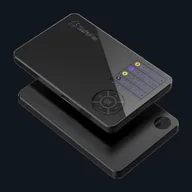 Illustration · not a product photo
Compact air gap signer with color display and secure element/CC claim; Multi-chain, firmware and client only partially open, without Bluetooth and USB signature path.
Status: 14.08.2026
At a glance
As a hardware wallet, the SafePal S1 is a compact air gap signer with a color display and secure element claim - multi-chain including Solana, use via app and QR, without USB signature path and without Bluetooth. Firmware and client are only partially open source; If you want complete transparency, compare BitBox, OneKey or Trezor.
iOS, Android and Windows are documented. There is no clear information in the features for macOS and Linux. EAL levels are not consistent in the sources - this is stated in the Contra points. The app is part of the workflow, not optional. QR air gap with partially closed software is a trade-off: isolation on the device, less transparency in the stack.
Opposite Ellipal Titanium 2 share air gap touch concept and closed or partially open software; SafePal remains more compact in marketing. Compared to Keystone, the source location and form factor differ; Compared to the Nano X, USB/Bluetooth stick logic is completely missing. QR air gap with partially closed software is a trade-off: isolation on the device, less transparency in the stack.
S1 is typically priced below premium touch air gap devices; RRP in features. This is not a “cheap air gap” recommendation, but rather the classification of the SafePal workflow. Compact air gap device with app requirement: display on the stick is small, the responsibility for checking the amount lies with the user workflow.
If you want complete software transparency, compare OneKey or Trezor in the same table of features - SafePal remains a price-conscious air gap with a partially closed stack.
If you want to compare alternatives, combine the characteristics table, pros/cons and the links under “Compare alternatives”.
You can also find the sources for individual information directly in the respective characteristics area.
Image source: SafePal Store gallery — S1 front/back still on dark hero canvas (s1_1v2_new111_2) · Press photo · 2026-08-10