How to Choose a Hardware Wallet: Key Buying Criteria
Choose a hardware wallet by reviewing backups, supported networks, displays, connections and companion software against your actual needs.
In this guide

A suitable hardware wallet first needs to meet your everyday requirements: which assets you manage, which phone or computer you use and how recovery should work. These questions create a useful shortlist. Then compare usability, price and additional features. The linked comparison documents model-specific features and helps you investigate unanswered questions.
Further reading: Comparison table, Methodology.
This guide summarizes Buying criteria together. It does not replace your own practical test and does not select a test winner.
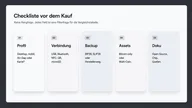
First
Usage profile, not the brand color.
Then
Backup that you can still do in five years.
Never
A touch of commission or marketing.
1. Define your intended use
Start with everyday life, not with the data sheet:
- USB entry: easy desktop use, e.g. B. Profiles like Ledger Nano S Plus or Trezor Safe 3.
- Mobile / Bluetooth: if you want to sign on the go - check characteristics in the table, e.g. b. Ledger Nano X.
- Touch display: Convenience vs. attack surface — e.g. b. Trezor Safe 5.
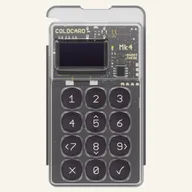
- Bitcoin / Air Gap: more restrictive workflows, e.g. b. Coldcard Mk4.
- Open source focus: Check firmware/client information and sources, e.g. b. BitBox02 Multi.
- Card shape: NFC without a classic display - clarify the backup concept beforehand.
The examples are anchors in the product details, not a recommendation. If you are unsure, you can ask the same questions Decision tree translate into filter.
2. Connection and operation
Filters in the table: USB, Bluetooth, NFC, Air-Gapped, Touch, Mobile.
More routes means more comfort and more places where you have to confirm something. Fewer routes mean longer processes and often clearer boundaries. Both can work - depending on whether you sign at your desk or on the go.
3. Check the complete recovery path
The backup method must fit your wallet and a possible replacement device. Check which words, shares or other backups are required and whether an additional passphrase is used. A familiar brand name is not enough: methods and supported formats may vary even within a model family. The questions below concern complete recovery and the safe organization of the required information.
Further reading: Backup and seed phrase.
Check questions before money goes to the device:
- Can I store the words (or parts) without a photo and without the cloud?
- Does a second person know in an emergency? that There is a fuse - without knowing it in everyday life?
- Have I read the brand's recovery path in the documentation, not just in the unboxing video?
4. assets
Asset support involves more than a familiar coin logo. Check the specific network, account type and companion software. Contract interactions also depend on which information is clearly displayed before authorization. A large touchscreen does not guarantee that every transaction is fully explained. What matters is the documented combination of device, firmware, wallet software and service.
5. Transparency instead of marketing
- Secure element and certification details are Manufacturer information with source, no independent laboratory assessment by us.
- Open source can mean “yes”, “partial” or “no” — not everything is equally open.
- Prices: List price information is often missing; Purchase links - if available - lead to marked redirects.
- Inclusion in the table follows the methodology, not the commission.
How to read the comparison table: Read comparison. Basics: What is a Hardware Wallet?.
Filters instead of grades: backup, coins, iOS, open source
Four characteristics are often added together to form a gut feeling. In the table they remain filters - independent of each other, without a score.
Backup. BIP39, SLIP39, passphrase, duplicate card, microSD: That's the path you'll have to explain in five years. A device with a “better” chip and a backup you don’t understand is the riskier setup. Details: Backup and seed phrase. In the table this is a column, not a star rating.
Check the specific assets, networks and applications you need. The label multi-coin does not establish support for every token or contract call. Transactions need an understandable presentation of relevant details. If the effects of an authorization are unclear, establish them using the appropriate documentation before confirming.
Further reading: Coldcard Mk4, Trezor Safe 3.
iOS and Companion. Whether the companion app runs on iOS, Android or just desktop is determined by everyday life, not security theory. Bluetooth or NFC methods often require exactly this app. If the information is missing, it says “under review”. We do not give a rating of “mobile friendly”. We show the cell. If you want to sign on the go, filter; If you stay at your desk, you don't have to.
Open source. “Yes”, “partially” or “no” — with source. Openness makes testing possible, it does not replace it. Firmware, client and secure element blob can have different levels of openness. BitBox02 Multi is an anchor for the open source focus on the details, not a test winner. Closed source shares for other brands are manufacturer information, not a laboratory note from us.
You combine these four filters yourself Decision tree bets the same chips. A close combination can empty the hit list — that's not a judgment on the market. How to read the table: Read comparison.
Classify each feature as required, preferred or optional. Missing support for a needed network may rule out a device, while a larger display may remain a usability preference. This separation prevents one appealing feature from obscuring an unclear recovery path or incompatible companion software. Priorities depend on your particular use and need not suit other users.
A second device for everyday amounts is organization, not a requirement and not a recommendation for a model. If you separate, you filter twice: once narrowly (long-term, air-gapped, Bitcoin-only), once conveniently (USB, multi-coin, mobile). Two hit lists are not a ranking against each other. Ledger Nano S Plus and Coldcard Mk4 are examples of different profiles in the details, not for place 1 and place 2.
The display hangs on the Coin and iOS filters without being a note itself. Anyone who signs contracts needs readable fields on the device - otherwise blind signing is the deliberate exception, not the default. If you only move Bitcoin at your desk, you can accept a small segment display. Both are in the connection column and on the model page, for example Trezor Safe 5 next to Trezor Safe 3. Same stamp, two lines.
Check the retrieval date before checking off a filter as completed. Companion apps and asset lists are changing. The table shows the status with source; she doesn't convert it into stars. Filter hardware wallets.
Build a shortlist in three steps
First, write down your required features. One example is managing Bitcoin on a desktop with a documented backup method. Another is using specific EVM networks through a compatible mobile wallet. These examples describe requirements without already selecting a particular model.
Next, review the current sources for the remaining devices. Operating-system support, asset lists and readable transaction displays may change with software versions. Distinguish confirmed support from unanswered questions. An open question calls for investigation, rather than a positive or negative quality verdict.
Finally, compare the complete purchase price, possible shipping charges and usability. Check whether the intended workflow requires accessories. Keep the official instructions for the chosen model so that the decision remains understandable later.
Frequently asked questions
Which criterion is the most important?
Start with the required assets, networks and an understandable recovery route. Then check operation and transaction display. A display can contribute to security verification; connectivity determines the usable workflow. Resolve an unclear backup process before using the device for holdings.
Should I buy the most expensive device?
No. Price is a rough bracket in the table, not a quality scale. Fit beats list price.
Can I combine multiple profiles?
Yes. Many people separate everyday amounts and long-term inventory. This is organization, not a recommendation for a model.