4 Hardware Wallet Brands: An Overview for 2026
An overview of Tangem, Trezor, Ledger and BitBox: compare form factors, backup methods and model-specific differences.
In this guide
Four device brands from our comparison - the numbers are for guidance only, no review. “To the offer” leads to the partner link stored on the respective model page, not to the deals hub. Backup, connection and open source status belong in the Comparison table. Other brands (e.g. Coldcard) are also there - this short list is limited to four entries.
Selection
Four well-known entries, not the entire market.
Numbers
Count through. No grade, no test winner.
Details
Always check the table with source.
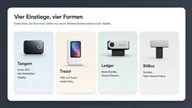
Read each card as a starting point: what is the form factor, where is the backup, how open is the software? The rows then belong in the table - not in a perceived ranking list.
Tangem
Card-shaped wallet with NFC — not a classic display device. Before purchasing, clarify how recovery and backup work.
Compact format · NFC use without an additional display device
Backup concept must be right · Offer and features may vary depending on the region
Trezor
Model range with strong open source documentation and touch devices. Features and sources are in the product details.
Comprehensible client and firmware documentation · Touch models in the series
Big differences between models · Secure Element is not the same for every device
Ledger
Broad device family with secure element focus and mobile connection per model. Information comes from the manufacturer - we do not evaluate it in the laboratory.
Many models · mobile use possible per device
Secure element and certification information are manufacturer information · Check closed source shares per component
BitBox
Swiss brand; BitBox02 Multi stands for open source focus and multi-coin. Check specific characteristics in the table.
Open source focus · clear multi-coin orientation at BitBox02 Multi
Smaller brand range · Details per model in the comparison table
Commercial note: “Go to offer” links (↗) can trigger a commission — selection, order and classification remain unaffected.
What all four share: You remain responsible for backup and confirmation. What separates them: housing, connection, openness of the software. We do not carry out a chip comparison without a source. The protection radius explained What a hardware wallet really protects.
Brands and models
A brand is a family of devices. Trezor, Ledger, BitBox and Tangem are names under which several models appear - with different displays, connections and backup methods. The cards above name the brand because that's the introduction: form factor, rough software stance, where you're looking for the documentation.
A model is the line in the Comparison table. Trezor Safe 5 is not “Trezor”. Ledger Nano X is not “Ledger”. BitBox02 Multi is not “BitBox” as a genre. Anyone who buys the brand without checking the model mixes a touch display with a small segment display, USB with Bluetooth, BIP39 with a manufacturer's own map backup.
The four entrances are intentional, not a catalog. Coldcard, Keystone, Foundation and others are in the table without getting a card here. This page answers: Which enclosure and which backup idea do I actually want to understand? The table answers: Which row meets the filters I can set?
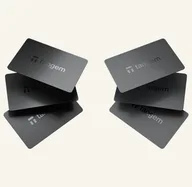
Brand switching between generations is normal. Firmware, companion app and supported assets change. That's why the retrieval date and source belong on the product detail page, not in a perceived ranking on this short list. A photo of the family - roughly the shape of a card Tangem Wallet — explains the format, not the quality compared to a USB device.
If you are unsure which family fits into everyday life, you can ask the same questions Decision tree translate into filter. The wizard opens the table. He doesn't give a grade.
What the brand overview can tell you
It is not a ranking. The numbers 01 to 04 count through. Alphabetical in this short list does not mean “better.” Sorting in the table follows the product name — see This is how you read our comparison.
It is not a laboratory test. We didn't measure the devices in everyday life for three weeks. Secure element information, open source status and certificates are manufacturer information with source. If a document is missing, the table often says “will be checked”. This is a loophole, not a hidden no and not a hidden recommendation.
It is not a price comparison. List prices are often missing or mix currencies. “To the offer” is a marked redirect if a partner link is stored - no statement about the cheapest shop and no statement about the “best deal”.
The selection introduces four well-known brand families. It does not cover the entire market or express a judgment on manufacturers not included. Other comparison-table devices may suit a particular need. Use this overview to understand different form factors and backup concepts, then broaden your selection using the required features.
It doesn't choose a test winner. There is no grade, no score and no “best wallet 2026”. What protects the device and what doesn't is stated What a hardware wallet really protects — regardless of the brand color.
From a brand family to a specific model
The overview is enough if you are still considering the form factor: card with NFC, USB stick with buttons, touch display, air gap with keyboard. Then the question is “do I fit this case?”, not “which brand wins?” A card without a display shifts the confirmation to the app or to a second device. A touch display shows fields on the device. Both can fit. Neither is a ranking.
You need the columns as soon as you want inventory on the device. Backup procedures, supported assets, companion on iOS or desktop, open source status and connection paths are filters — see Buying criteria. They are not added to an overall grade. A line “Open Source: yes” and a line “iOS: yes” are two independent features, not a plus point system.
A non-judgmental example: Anyone who only holds Bitcoin and wants to move the key without a permanent data connection will read different lines than someone who signs multi-coins on the go. Both can occur in the same brand family. Therefore the map above does not replace the model page.
Once you identify a suitable form factor, open the specific model profile. Review supported assets, companion software, connections and recovery. Record which prerequisites are met and which remain unresolved. A familiar brand name or product photograph does not answer these technical questions; you need documented details for the chosen model.
Older and newer models may be offered within the same brand. Check the precise model name and the firmware and software versions in the linked documentation. Differences in display, backup and operating-system support can affect the intended workflow. A brand-level statement should influence your choice only when it is also documented for the particular device.
The same applies to offers. A partner link stored on a model page is not an argument for ignoring the other three brands. It is a marked path in case you decide on exactly this line after reading the table. The Buying criteria Filters remain, even if there is a “Go to offer” button next to them.
After the form factor comes the model page, not the next brand card. Tangem Wallet explains map and backup route; BitBox02 Multi explains open source focus and multi-coin in details. Both lines are in the Comparison table next to devices that don't have a card here. The shortlist ends once you know which columns you want to read — Backup first, then Assets and Connection.
Create a model comparison checklist
Choose two specific devices and use the same intended use for both. Check essential requirements first, such as the needed network and operating system. Then compare recovery and the information available before authorization. This makes the comparison more meaningful than differences in appearance or presentation.
For offers, also check the model variant, included items, region and final price. Labeled offer links provide possible purchase routes. They replace neither source verification nor consideration of other devices. Keep selection notes alongside official instructions; secret backup data does not belong in this checklist.
Frequently asked questions
Why only four brands?
Because this is an introduction, not a catalog. Coldcard, Keystone, Foundation and others are in the comparison table - without appearing in this short list.
Is the order a ranking?
No. The numbers count down. Sorting in the table follows the product name.
What backup do I need to understand?
That of the brand you buy. Card, USB and Shamir are different paths with the same consequence: whoever has the backup has the assets.
Is the brand overview enough to make a purchase?
No. It's enough for the form factor. Backup, assets and connection belong in the table and on the model page — not in the four cards.