OneKey Neo: price, specs and differences to the Pro 2
OneKey Neo for €159: display, secure elements, connections and backup from manufacturer sources. What is missing compared with the Pro 2, and who should take a look?
In this guide
On 9 November 2026, OneKey introduced the Neo, a hardware wallet with a large colour display for €159 (USD 179). The device takes its display and operating system from the Pro 2, which is one month older, but leaves out the camera, fingerprint sensor and Apple Find My. This guide shows what the official documents prove, what is still open and how to tell the Neo and Pro 2 apart. We retrieved all manufacturer pages on 15 November 2026.
Our assessment is source research; we have done no hands-on test. We have not held a Neo and cannot confirm operation, battery life or delivery time from our own experience. We do not award our own score or ranking.
Price
€159 in the OneKey shop, free shipping.
Connectivity
Bluetooth, USB-C and NFC, no QR signing.
Backup
12/24 words, SLIP39 shares, SeedCard optional.
Price and availability: what is confirmed?
According to the launch post, the Neo is available “now” in four colours: Cloud White, Mist Black, Moss Green and Blossom Pink. On 15 November 2026, the official shop shows a price of €159 (USD 179 in US dollars), free shipping and an add-to-cart button. On the same day, the Pro 2 is still listed in the shop as a pre-order with separate shipping in November.
For the delivery region Europe, the shop showed an estimated arrival in 1–3 working days on the same day. Whether VAT and possible import duties are included in the price is not stated on the product page; only checkout shows that. Whether and when retailers in Germany will stock the Neo was not apparent from official sources on the research date.
According to the shop, the package contains only the device, a recovery sheet and a USB-C cable. Accessories cost extra (prices in US dollars): SeedCard USD 39, silicone case USD 39, screen protector USD 19 and engraving USD 49. A charging pad for wireless charging is not listed in the package contents.
Official OneKey Neo shop page.
OneKey Neo vs Pro 2: the differences
OneKey positions the Neo as a lighter everyday device and the Pro 2 as the fully equipped flagship. According to the manufacturer, display, operating system and app are the same. The differences lie in the signing route, chips, unlocking and package contents.
| Feature | OneKey Neo | OneKey Pro 2 |
|---|---|---|
| Price in the OneKey shop | €159 (USD 179) | €269 (USD 299) |
| Order status on 15 November 2026 | Available to order in the shop | Pre-order, shipping in November |
| Display and system | 3.54-inch AMOLED, safeOS 2 | 3.54-inch AMOLED, safeOS 2 |
| Secure elements | 2 × EAL6+ (THD89) | 4 × EAL6+ |
| Connectivity | Bluetooth, USB-C, NFC | Bluetooth, USB-C, NFC and QR via camera |
| Unlock | PIN | PIN and fingerprint |
| Apple Find My | No | Announced for a later OTA update |
| Scope of delivery | Device, recovery sheet, cable | Plus SeedCard, folio case and 6 months of App Prime |
| Back and colours | Fibre composite; four colours | Glass; three colours |
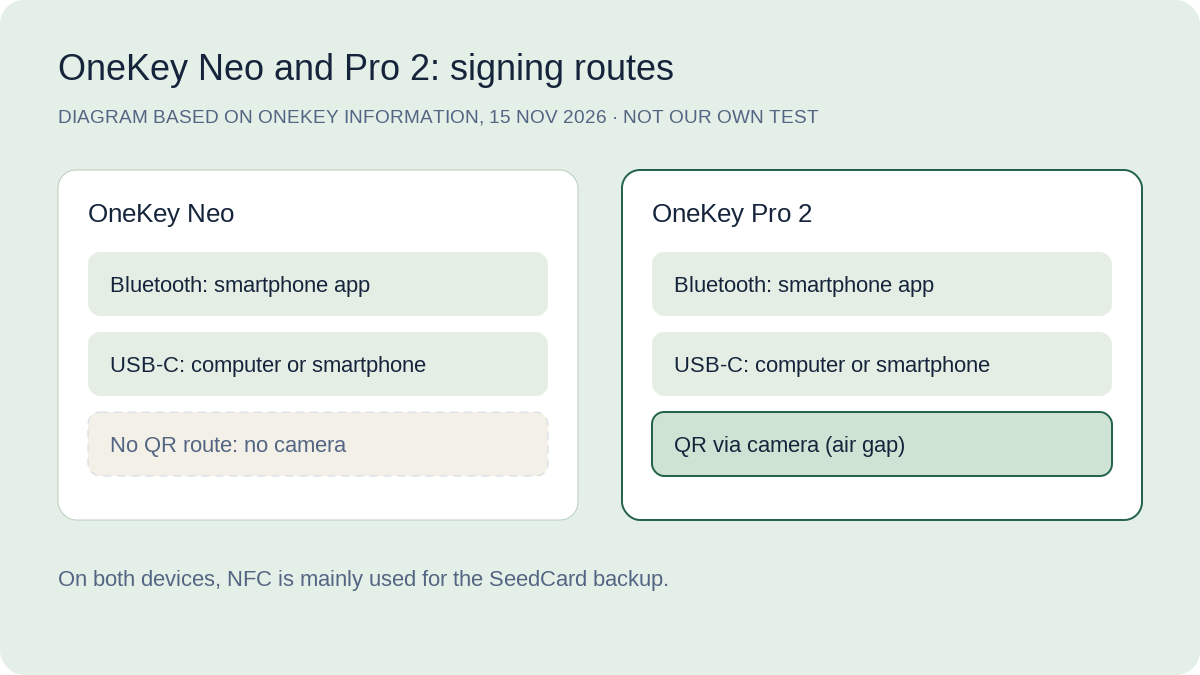
The most important difference is the camera. Without it, the Neo has no QR signing in which the device stays without a cable or wireless connection. If you want to use this air-gapped route, you need the Pro 2 or another QR device. According to the manufacturer, both devices are designed for everyday confirmation via Bluetooth on a smartphone or via USB-C on a computer.
Go to the direct comparison OneKey Neo vs Pro 2.
What the Pro 2 adds, in the Pro 2 guide.
Technical specifications according to the manufacturer
The table summarises the shop page. These are manufacturer specifications that we have not measured ourselves.
| Area | Specification |
|---|---|
| Display | 3.54-inch AMOLED colour touchscreen, 1024 × 604 pixels, up to 800 nits, Corning Gorilla Glass 5 |
| Housing | Aluminium alloy frame, fibre composite back, 84.9 × 53.2 × 6.1 mm |
| Battery | 700 mAh, wireless charging and USB-C (5 V / 2 A), at least 500 charge cycles to 80% remaining capacity |
| Protection | IP56 against dust and splashes according to the launch post |
| Operating systems | Windows 10+, macOS 10.11+, Linux, iOS 14+, Android 8+ |
| Assets | More than 30,000 coins and tokens according to OneKey; multisig with Safe, Squads and Sparrow mentioned |
| Privacy | Coin control and Tor marked “coming soon” |
The sources contradict each other on weight and thickness: the shop page states 48 g and 6.1 mm, the comparison table in the launch post 51 g and 6.2 mm. The dimensions in the table come from the shop page; we do not treat any weight value as confirmed.
Product page with all technical specifications.
What is available today, and what comes by update?
OneKey's own documents distinguish between available and announced features. For your buying decision, only what actually runs in your shipped firmware counts.
| Function | Status according to the manufacturer on 15 November 2026 | What it means for you |
|---|---|---|
| Passkey via USB-C (FIDO2) | Described as available in the launch post | Check support by the respective service |
| Offline TOTP codes | Future OTA update | Keep your existing two-factor methods |
| NFC touch authentication | Future OTA update | Do not count on it as a reason to buy |
| On-device portfolio view | Described in the launch post; data comes from the OneKey app | Check whether it is enabled in your firmware |
| Coin Control and Tor | “Coming soon” | Do not count it as a current privacy feature |
On the portfolio view: the launch post describes it for the Neo as part of safeOS 2, with data synchronised via the OneKey app. What the device shows therefore depends on when you last synchronised with the app. On 15 November 2026, OneKey support still describes the same feature for the Pro 2 as upcoming.
Portfolio sync in OneKey support (Pro 2).
Backup: word list, SLIP39 and SeedCard
The shop page lists recovery phrases with 12 or 24 words and SLIP39 shares with 20 words. These are two different formats: a BIP39 word list restores the wallet on its own, while SLIP39 splits the backup into several shares, of which a set minimum number must be combined. Choose a format deliberately before setup.
The SeedCard is not included with the Neo. According to OneKey, you hold the card against the device, set a PIN and store the recovery phrase encrypted on the card. This is a manufacturer-specific card method. It does not answer the question of where the word list or the SLIP39 shares are kept safe.
On the research date we did not find a dedicated help article on recovery or an additional passphrase for the Neo. When switching from another wallet, check a known address of the same account and network after recovery, before you reset the old device.
Understand BIP39, SLIP39 and passphrases in detail.
Security claims: what they prove
OneKey lists two THD89 secure elements with an EAL6+ rating, which are meant to protect private keys and the PIN separately. This is a claim about the chip, not a certification of the whole wallet. According to the manufacturer, firmware and app are open source; OneKey names SlowMist and Keylabs as auditors. We have not evaluated the audit reports ourselves.
Further manufacturer claims are Clear Signing, meaning readable transaction details on the display, and the SignGuard risk check in the OneKey app. OneKey commits to security updates for at least five years from market launch. We do not treat the reference to a “quantum-ready” architecture as proven protection.
No chip does your own checking for you: verify the recipient, amount, network and approvals on the device display before you confirm.
Hardware wallet protection and its limits.
Who should take a closer look at the Neo?
The Neo suits you if you want to use the large colour display for frequent confirmations on your smartphone or computer and do not need QR signing. OneKey itself also describes it as a handy second device for everyday use alongside a cold wallet for larger holdings.
The Pro 2 is the obvious alternative if you want to sign by QR without a cable or wireless connection, want fingerprint unlock or the announced Apple Find My, or would buy the SeedCard and a case anyway. In that comparison, add the Neo accessories to its price.
Four questions before ordering
- Signing route: Are Bluetooth and USB-C enough, or do you need QR signing without a connection?
- Compatibility: Do the device, firmware and app support your specific assets, networks and multisig tools?
- Backup: Have you decided whether you use a word list, SLIP39 shares or an additional SeedCard?
- Order: Have you checked the final price, taxes and delivery time at checkout, and does the device make sense without the announced updates?
OneKey sells the Neo in its own shop. The following link is a partner link to it:
OneKey Neo in the OneKey shop ↗Advertising
OneKey Neo: features and sources in the product profile.
Compare hardware wallets against your requirements.
Use the hardware wallet buying checklist.
What is still open
We could not clarify these points from official sources on 15 November 2026. We will add them once OneKey documents them.
- Whether VAT and duties are included in the euro price
- Availability from retailers in Germany
- A definitive weight (48 g or 51 g)
- Dedicated help articles on setup, recovery and passphrase for the Neo
- A public firmware repository or release notes specifically for the Neo
- Release dates for offline TOTP and NFC touch authentication
Frequently asked questions about the OneKey Neo
How much does the OneKey Neo cost in euros?
In the official OneKey shop, the Neo costs €159 on 15 November 2026 if you select euro as the currency; in US dollars it is USD 179. According to the shop, shipping is free, and for the delivery region Europe it stated 1–3 working days. Whether VAT and duties are included is only shown at checkout. For comparison: the Pro 2 costs €269 there.
What is the difference between the OneKey Neo and Pro 2?
According to OneKey, both have the same 3.54-inch AMOLED display and safeOS 2. The Pro 2 adds a camera for QR signing, four instead of two secure elements, fingerprint unlock and Apple Find My, which is announced for a later update. The Pro 2 also comes with a SeedCard, a folio case and six months of App Prime. In the OneKey shop, the Neo costs €159 and the Pro EUR 2269.
Can the OneKey Neo sign via QR code?
No. According to OneKey, the Neo has no camera and connects via Bluetooth, USB-C and NFC. According to the manufacturer, NFC is mainly used for the SeedCard backup. If you want to sign transactions by QR code without a cable or wireless connection, you need the Pro 2 or another device with a camera. The Neo is designed for confirmations on a smartphone or computer.
Is the SeedCard included with the OneKey Neo?
No. According to the shop page, the box contains only the Neo, a recovery sheet and a USB-C cable. The SeedCard costs USD 39 separately. It stores the recovery phrase encrypted on an NFC card with its own PIN. It is an additional, manufacturer-specific method and does not replace keeping the word list or SLIP39 shares safe.
Do passkeys and TOTP already work?
In the launch post, OneKey describes passkeys via USB-C as available and says the Neo is FIDO2 certified. Offline TOTP codes and NFC touch authentication are only due with a later OTA update. Keep your existing login and recovery methods until the feature you want is documented as enabled in your firmware, and check whether your service supports hardware passkeys.
Has JMRKT tested the OneKey Neo itself?
No. This guide evaluates OneKey's official product, shop and launch pages, retrieved on 15 November 2026. We have not checked the display, battery life, operation or security on a device of our own. Manufacturer claims and announced features are labelled accordingly; we do not derive a test score or ranking from them.