OneKey Pro 2: what is new, and what comes later?
Understand OneKey Pro 2 pricing, pre-orders, changes from Pro and safe setup, including SeedCard and SLIP39. Includes a migration checklist.
In this guide
OneKey Pro 2 has been announced. Three questions matter more than its new casing: what can you do today, which functions still need an update, and how can you safely reuse your existing backup? This guide answers them using official product and support documents, checked on 11 October 2026.
Our assessment is based on source research. We have not tested a device ourselves and cannot independently confirm delivery dates or the quality of the user experience.
Ordering
From USD 299; currently pre-order.
Backup
Check BIP39, SLIP39 and SeedCard.
Updates
Find My and TOTP arrive later.
Price and availability: what does the launch mean?
The launch took place on 8 October. On the research date, the order page shows “Pre-order” and a starting price of USD 299. This is a reference in the source currency. Delivery timing, taxes, shipping and the actual price for your country are confirmed at checkout. We do not convert the dollar price into an unverified euro price.
The listed package includes SeedCard, a Fabric Folio Case, a USB-C cable, a recovery sheet and six months of OneKey App Prime. Before buying, check which membership benefits you need and the terms after that period. The advertised bundle value is not a saving if you would not otherwise have bought the extras.
Official order page with current availability.
OneKey Pro vs Pro 2: read the differences carefully
The new model emphasises an AMOLED display and additional backup and everyday functions. QR signing, a fingerprint sensor and wireless charging are already documented on Pro. If you own the earlier model, identify a specific benefit before upgrading.
| Feature | OneKey Pro | OneKey Pro 2 |
|---|---|---|
| Display | 3.5-inch IPS touchscreen | 3.54-inch AMOLED touchscreen |
| Connection routes | USB-C, Bluetooth, QR and NFC according to the manufacturer | USB-C, Bluetooth, QR and NFC according to the manufacturer |
| SLIP39 | Documented since firmware 4.15.0 | 20-word shares in the technical specifications |
| Card backup | OneKey Lite according to the recovery guide | SeedCard in the listed package |
| On-device portfolio | No Pro 2 portfolio sync | Advertised; support still calls it “upcoming” |
Manufacturer comparison and technical specifications.
Pro firmware: SLIP39 since version 4.15.0.
View the full Pro vs Pro 2 comparison.
Which functions require future updates?
The following distinctions separate documented hardware and available instructions from explicit announcements. A tick in a marketing table does not prove a function already works in the firmware you receive. Pay particular attention to features your purchase decision depends on.
| Function | Documented status on 11 October 2026 | What it means for you |
|---|---|---|
| Touchscreen, fingerprint, USB-C and Bluetooth | Described in specifications and setup instructions | Check the app and firmware for your workflow |
| QR air-gap | Described by the manufacturer | Check the asset and compatible QR client separately |
| FIDO2 passkeys over USB-C | Described in the launch announcement | Check login support for the service you use |
| Apple Find My | Future OTA update | Do not yet rely on available device tracking |
| NFC passkeys and TOTP | Future OTA update | Keep other login and recovery methods |
| Portfolio sync | Product page advertises it; support: “upcoming” | Confirm availability before buying |
| Coin Control and Tor | Specifications: “coming soon” | Do not count these as current privacy functions |
Launch announcement with future OTA feature notes.
Portfolio display: a synced view, not an independent data source
OneKey describes the data flow as OneKey App → Bluetooth or data cable → Pro 2. The device does not independently fetch blockchain data or prices from the internet. Its display can therefore only show the last synced state. That is neither proof of a current market price nor proof that you can sign for a particular wallet.
Support explicitly describes Sync Portfolio as an upcoming feature for the combination of Pro 2 and OneKey App. Until availability is confirmed, we treat the display as an announcement with a documented workflow. If you want QR signing without radio or cable contact, also note that this portfolio data flow specifically uses Bluetooth or a data cable.
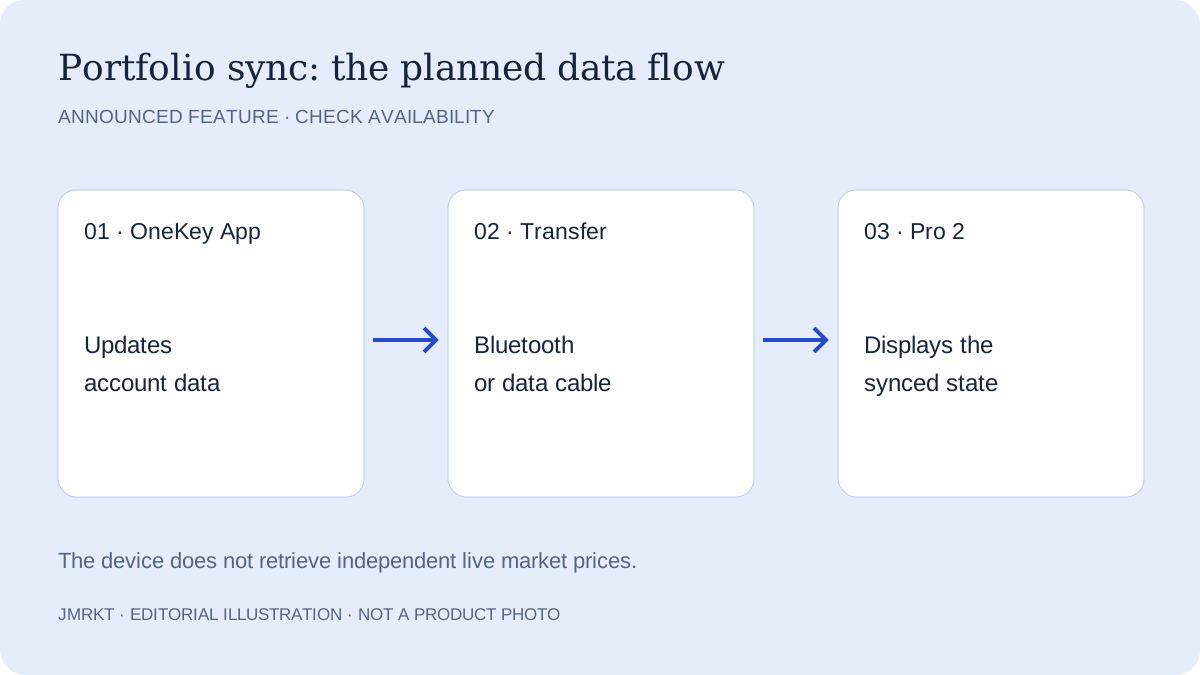
Portfolio sync in OneKey support.
SeedCard, BIP39 and SLIP39: different terms, different roles
The specifications list recovery phrases with 12 or 24 words and SLIP39 shares with 20 words. A BIP39 word list is not a SLIP39 share. For a split backup, the shares must match the original configuration and meet its threshold. Word count alone is not enough to establish compatibility.
OneKey describes SeedCard as an additional encrypted NFC backup with a PIN. It is a separate card-based route that helps only with a documented compatible recovery procedure. Record which backup belongs to which wallet, how the card is protected and whether an additional passphrase was used. Store the backup and device so that one loss does not affect both.
Quick backup verification using the device PIN simplifies certain backup operations. It does not replace a recovery backup. If the device is lost or damaged, the PIN alone cannot reconstruct a wallet. Decide deliberately whether this convenient verification method suits how you protect your device and PIN.
OneKey explains quick backup verification.
Understand BIP39, SLIP39 and passphrases in detail.
What does each part of your backup do?
| Component | Purpose and limitation |
|---|---|
| BIP39 word list | Restores the wallet derived from it. Any additional passphrase used must also be available. |
| SLIP39 shares | Distribute the backup according to a defined threshold. Individual or mismatched shares may not be sufficient for recovery. |
| SeedCard / OneKey Lite | Use a manufacturer-specific card procedure. Check exact card and device compatibility in the recovery guide. |
| Device PIN and fingerprint | Protect access to the existing device. They cannot reconstruct a wallet when the device is lost. |
Move safely from Pro or another wallet
A new device and new keys are two different decisions. Restoring an existing wallet preserves its keys. Transferring to a wallet created on the new device uses new keys and requires on-chain transactions. The second route may make sense if the old backup has been used online or may have been exposed; changing devices does not erase that history.
| Step | Practical check |
|---|---|
| Take stock | List wallets, networks, accounts and any passphrase used. Do not enter secrets on this website. |
| Check the backup | Check completeness and format against the original setup. Keep the existing device until this is resolved. |
| Choose recovery | Use the word list or documented Lite/SeedCard recovery on Pro 2. For SLIP39, check the correct procedure and shares. |
| Match addresses | Match a known address for the same account and network. If it differs, stop and check the passphrase and account path. |
| Check a transfer | For new keys, send a small test amount first, verify receipt and later signing, then transfer more holdings. |
OneKey documents recovering a Pro wallet previously backed up with OneKey Lite on Pro 2. This is not a promise for arbitrary card products. A hidden passphrase wallet requires exactly the same additional passphrase; the correct word list alone is insufficient. Enter backups only through the intended device procedure, never in a browser, support chat or supposed verification portal.
Official Pro 2 recovery instructions.
Preserve access first if your backup is missing.
Before the first substantial transfer
- Open the app and setup guide through the official manufacturer website. Follow its checks for packaging, device and firmware.
- Decide before setup whether to restore existing keys or create a new wallet. For a new wallet, backup data must be created through the intended device process; a pre-filled word list is not your own newly generated backup.
- Check the backup and any passphrase using the documented procedure. Keep the previous device and existing backups until this is successfully completed.
- Compare the receiving address on the device with the intended destination and correct network. When moving to new keys, start with a small amount and also check that a transaction can be signed correctly.
Security claims: what they establish and their limits
Four Secure Elements with an EAL6+ claim are a feature of the documented chip design. They do not establish a ranking of secure wallets. Open source helps inspect code, and readable transaction data helps review actions. Neither removes the need to check addresses, networks, amounts and approvals.
QR air-gap is a Pro 2 signing mode, not a claim that the device contains no radio hardware. Similarly, Find My is an announced tracking aid and does not protect an exposed backup. A fingerprint unlocks the device; it replaces neither a backup nor transaction review.
Hardware wallet protection and its limits.
Who should take a closer look at Pro 2?
The model is worth considering if you want multi-chain use, touch interaction and an optional QR workflow, and deliberately plan SeedCard as an additional backup route. Check support for your specific assets and wallet apps first. A large advertised token count does not answer that question.
The documentation gives existing Pro users no blanket reason to replace their device. SLIP39 and QR are not exclusive additions in the new model. An upgrade can make sense if a documented difference improves your workflow and you accept the pre-order status and outstanding software functions. If an announced feature is decisive, wait for its documented release.
Four questions before ordering
- Usefulness: Which already documented difference from your current device improves your actual workflow?
- Compatibility: Does the combination of device, firmware and app support your specific assets, networks and preferred signing method?
- Backup: Have you checked the format, complete backup and any passphrase before resetting the previous device?
- Order: Are the final price and shipping date clear, and does the purchase still make sense without the announced updates?
OneKey Pro 2: features and sources in its product profile.
Compare hardware wallets against your requirements.
Use the hardware wallet buying checklist.
Frequently asked questions about OneKey Pro 2
Is OneKey Pro 2 already shipping?
On 11 October 2026, the official order page lists OneKey Pro 2 for pre-order from USD 299. This does not establish immediate availability. Check the shipping date for your variant, taxes, shipping charges and final price at checkout. If no date is shown, confirm it with the manufacturer before ordering.
Do Apple Find My and TOTP already work?
OneKey announces Apple Find My and TOTP for future OTA updates. The launch also describes NFC passkeys as a later addition, distinct from the USB-C passkey described there. Do not base the purchase solely on an announced feature, and keep existing sign-in and recovery methods until the feature you need has a documented release.
Is SLIP39 new compared with OneKey Pro?
No. OneKey documents SLIP39 on the original Pro from firmware 4.15.0. SLIP39 alone is therefore not a reason to replace the device. What matters is the installed firmware, the original backup method and the required number of matching shares. Simply splitting a BIP39 word list differently does not turn it into a SLIP39 backup.
Can I use my old OneKey Lite backup?
Yes. The Pro 2 recovery guide describes importing a wallet previously backed up with OneKey Lite. Follow its card recovery procedure, then check a known address in the correct account and network. An additional passphrase wallet also requires exactly the same passphrase. Reset the old device only after checking access and the complete recovery path.
Does the portfolio display fetch current prices itself?
No. According to OneKey support, the app updates the data and transfers it to Pro 2 over Bluetooth or a data cable. The device does not independently retrieve blockchain data or market prices from the internet, so its display may be out of date. Support still describes Portfolio Sync as upcoming on the research date; actual availability needs to be checked.
Has JMRKT tested the device?
No. This guide is an editorial assessment of official product, launch and support documents checked on 11 October 2026. We have not tested display quality, battery life, recovery reliability or security on our own device. Manufacturer claims and announced features are labelled accordingly; we do not derive a review score or security ranking from them.