English

COMPARE
English

Direct comparison

BitBox02 Multi vs Trezor Safe 3

Two open-source devices over USB-C: BitBox02 Multi with microSD backup (EUR 149), Trezor Safe 3 with SLIP39 multi-share backup and Solana support (EUR 79).

Updated

AdvertisingThe “To the offer” buttons are paid partner links. If you sign up through them, JMRKT may receive a commission. Selection and presentation do not depend on it.

What matters

Key differences to help you choose, without an overall score.

  1. BitBox02 Multi

    • If you want to manage Bitcoin and Ethereum/ERC-20 through a wired BitBoxApp connection.
    • If open firmware and a microSD backup matter more to you than Bluetooth, iPhone signing or Solana.
  2. Trezor Safe 3

    • If you want to use open firmware and Trezor Suite through a wired connection.
    • If you want to set up a SLIP39 multi-share backup and can work with buttons and a small screen.

Features

Differences4

Shared features9

Overview

Conclusion — Strengths, limitations and suitable uses. Your workflow and the functions it requires are what matter.

Editorial assessment

BitBox02 Multi and Trezor Safe 3 are two hardware wallets with open-source firmware and companion software. Both connect via USB-C and have a monochrome display, no battery and a secure chip listed as CC EAL6+. They differ in backup, coin coverage and price.

The backup works differently on the two devices. The BitBox02 Multi by Shift Crypto (list price EUR 149) also backs up to a microSD card and uses a BIP39 seed; anti-klepto protects signing. The Trezor Safe 3 (list price EUR 79) with an Optiga secure element supports SLIP39 alongside BIP39, a backup made of several shares of which a set number is needed for recovery.

In coin coverage, the Trezor Safe 3 covers Bitcoin, Ethereum with EVM networks and Solana. The BitBox02 Multi focuses on Bitcoin plus Ethereum and ERC-20 and does not support Solana. The BitBox02 is not designed for the iPhone; on the Safe 3, iPhone use is limited. Details in the BitBox02 Multi product profile and in Trezor Safe 3 product profile.

There is no test winner. If you need a multi-share backup or Solana, compare the Trezor Safe 3; if you prefer a microSD backup and anti-klepto, look at the BitBox02 Multi. Before a recovery, backup format, number of shares and passphrase must match the existing backup.
01

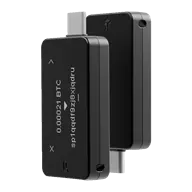
BitBox02 Multi

Pros

  • Firmware and client designated as open source
  • Dual chip and CC-EAL6+ manufacturer information
  • microSD backup, BIP39 and Anti-Klepto documented
  • Desktop OS and Android supported

Cons

  • In this comparison: Higher RRP (EUR 149)
  • No air gap
  • No iOS and no Bluetooth
  • Solana not supported
  • Fewer chains supported than multiple multi-chain devices
  • No SLIP39

more suitable if...

  • If you want to manage Bitcoin and Ethereum/ERC-20 through a wired BitBoxApp connection.
  • If open firmware and a microSD backup matter more to you than Bluetooth, iPhone signing or Solana.
02

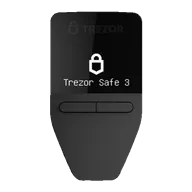
Trezor Safe 3

Pros

  • In this comparison: RRP EUR 79
  • Open source firmware and Trezor Suite
  • Optiga Secure Element and CC-EAL6+ manufacturer information
  • SLIP39 multi-share in addition to BIP39
  • Multi-coin including Solana

Cons

  • ShipMonk breach: affected Trezor customers’ order data was exposed, increasing phishing risk. Trezor says devices and wallet keys were not affected.
  • No air gap
  • No Bluetooth; iOS only limited
  • Small monochrome display

more suitable if...

  • If you want to use open firmware and Trezor Suite through a wired connection.
  • If you want to set up a SLIP39 multi-share backup and can work with buttons and a small screen.

Sources & notes