English

COMPARE
English

Direct comparison

Keystone 3 Pro vs Trezor Safe 5

Two touch devices with different signing paths: Keystone 3 Pro via QR air gap and battery (USD 129), Trezor Safe 5 via USB with Trezor Suite (EUR 169).

Updated

AdvertisingThe “To the offer” buttons are paid partner links. If you sign up through them, JMRKT may receive a commission. Selection and presentation do not depend on it.

What matters

Key differences to help you choose, without an overall score.

  1. Keystone 3 Pro

    • If you want to check multi-chain transactions on a touchscreen and sign via QR codes with compatible wallet apps.
    • If you prefer a separate air-gapped workflow and do not need Bluetooth.
  2. Trezor Safe 5

    • If you want to combine open firmware with touch controls in Trezor Suite.
    • If you want a SLIP39 multi-share backup and USB signing without requiring full iPhone signing.

Features

Differences6

Shared features7

Overview

Conclusion — Strengths, limitations and suitable uses. Your workflow and the functions it requires are what matter.

Editorial assessment

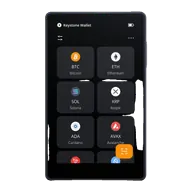
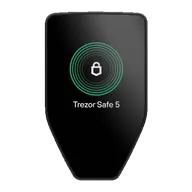
Keystone 3 Pro and Trezor Safe 5 are hardware wallets with a touch display. The main difference is therefore not the operation but the signing path: Keystone signs via QR code without a cable connection (air gap) and runs on a battery; Safe 5 is connected via USB and used with Trezor Suite. Neither has Bluetooth or NFC. According to the catalog, both support Bitcoin, Ethereum/EVM and Solana as well as BIP39, Shamir backup (SLIP39) and a BIP39 passphrase.

Keystone 3 Pro fits if you want to sign without a cable connection to a computer or smartphone. Transactions run via QR codes with compatible wallet apps. According to the catalog, the firmware is only partly open source; the manufacturer names three secure element chips, two of them CC EAL5+. iPhone signing is recorded as supported in the catalog.

Trezor Safe 5 fits if you prefer a wired workflow with Trezor Suite. The firmware is fully open source; the manufacturer states a CC EAL6+ secure element. There is no air gap, and according to the catalog iPhone signing is only partly possible.

USD 129 for Keystone and EUR 169 for Safe 5 are list prices in different currencies. For a price decision you need a common final price including shipping and taxes.

There is no overall rating. Keystone 3 Pro for QR air gap and mobile use without a cable; Trezor Safe 5 for open firmware and the USB workflow with Trezor Suite. Before a recovery, the same applies to both: format, number of shares and passphrase of an existing backup must match.
01

Keystone 3 Pro

Pros

  • Air gap via QR and microSD
  • Touch display and battery
  • Multiple Secure Elements with CC-EAL5+ manufacturer information
  • Multi-chain including Solana
  • Fingerprint sensor and multi-seed
  • Shamir backup with multiple recovery shares is documented

Cons

  • Larger touchscreen device; no Bluetooth
  • A compatible wallet app is required for each asset; not every integration supports every feature
  • Check the backup format and firmware version before restoring

more suitable if...

  • If you want to check multi-chain transactions on a touchscreen and sign via QR codes with compatible wallet apps.
  • If you prefer a separate air-gapped workflow and do not need Bluetooth.
02

Trezor Safe 5

Pros

  • Touch display
  • Open-source firmware and client
  • Secure Element with CC-EAL6+ manufacturer information
  • SLIP39 Multi Share
  • Multi-coin support via Trezor Suite

Cons

  • ShipMonk breach: affected Trezor customers’ order data was exposed, increasing phishing risk. Trezor says devices and wallet keys were not affected.
  • No air gap
  • No Bluetooth; iOS only limited

more suitable if...

  • If you want to combine open firmware with touch controls in Trezor Suite.
  • If you want a SLIP39 multi-share backup and USB signing without requiring full iPhone signing.

Sources & notes