German Crypto Tax Reports: Native Reports, CSV & API
Document crypto transactions: distinguish provider reports, CSV and API exports, check completeness and combine data from multiple wallets.
In this guide
The comparison table sorts regardless of affiliate commission — see Methodology: Crypto Exchanges. This text does not choose a test winner and does not replace your own practical test.
A tax report or export helps you document crypto transactions in a traceable way. Two separate questions matter: in what format do you receive the data, and which events does it include? This guide explains the catalog entries provider report, CSV, API export and no report, plus additional checks when using multiple accounts and wallets.
The roles — broker, exchange, Bitcoin-only app — are in place Crypto Broker vs Exchange vs Bitcoin App: The Differences. Unranked brands: 5 Crypto Platforms: An Overview for 2026. This is about one Cell: the documented format. All labels are below Catalog status 2026-08-15, no own measurement and no downloaded report.
Column
Native · CSV · API export — format only.
Limit
No tax treatment in this text.
teaching case
ETP report ≠ coin report.
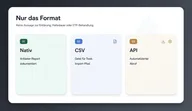
Export functions: benefits and limits
Pros
- Before onboarding, you can see whether the platform allows an export documented. This is onboarding information, not a seal of approval.
- Germany, Austria and Switzerland brokers in the characteristics often native (BISON, Bitpanda, Trade Republic, Scalable Capital) — Comfort of the cell, not “enough for the tax office”.
- CEX lines are mixed: Coinbase Advanced Trade native, Kraken API export, OKX and 21bitcoin CSV. The difference can be seen before you buy a tool.
Cons
- “Native” does not mean “enough for your explanation”.
- An ETP with a native report (scalable) is not a coin report. Anyone who confuses the two exports the wrong thing.
- “No report” or a missing cell is not a license to leave nothing behind — and we don’t fill any gaps with estimates.
- We didn't pull a report. The cell is a catalog, not a laboratory.
Catalog status 15.08.2026
Hub: Crypto exchange comparison. Broker cut: same table with broker filter.
| product | Tax report DE (catalog) |
|---|---|
| BISON | Native |
| Bitpanda | Native |
| Trade Republic | Native |
| Scalable Capital | Native |
| Coinbase Advanced Trade | Native |
| 21bitcoin | CSV |
| OKX | CSV |
| Kraken | API export |
Provider examples reflect the catalog as of 15 August 2026. Functions may have changed since then. Check the export available today for the specific account type and region. Other venues, especially derivatives platforms, may differ in data coverage and export routes.
Further reading: Understanding perpetual DEXs.
Four export entries explained
Native. According to its features, the platform provides its own report. The cell does not say whether it is a PDF, an area in the app or an annual file. The cell does not say whether the report includes trades, staking, card payments, deposits or just spot. The cell does not say whether the tax office knows the format.
CSV is a tabular file. Before importing, check supported columns and their meaning, such as timestamp, asset, quantity, fees and transaction identifier. Different date formats, time zones and decimal separators can complicate matching. Keep the unchanged original file and compare the import with account history.
An API export retrieves data through a technical interface. Check the supported period and events covered. Credentials for data importing alone should be restricted to read access; trading and withdrawal permissions are unnecessary. Share an API key only with the intended service and revoke access that is no longer needed.
No report. You document yourself. This is a catalog statement, not an Excel guide and not a request to do nothing.
None of the words are a statement about tax treatment. Not a word about paragraphs, exemption limits, holding periods, wallet transfers, ETP versus spot, compensation or commerciality. Anyone who needs this needs a tax advisor. We list formats.
Compare costs and data exports as separate criteria
Purchase costs and export convenience are independent selection criteria. A higher spread does not establish a better report; an API export does not establish lower total costs. Check both for your actual usage. With many transactions, a suitable import route can reduce record-keeping work if it reliably covers the relevant data.
Catalog status 2026-08-15, purchase line for classification (excluding Trade Republic — costs Unknown):
| Platform | Cost (EUR 1,000) | German tax report | Payout your own wallet |
|---|---|---|---|
| BISON | EUR 12.50 · 1.25% | Native | Yes · free |
| Bitpanda | EUR 14.90 · 1.49% | Native | Yes · 0.0001 BTC |
| 21bitcoin | EUR 14.90 · 1.49% | CSV | Yes · 0.00005 BTC · Lightning |
| Scalable Capital | EUR 10.89 | Native | No (ETP) |
| OKX | EUR 1.00 · 0.1% | CSV | Yes · plus network fee |
| Coinbase Advanced Trade | EUR 6.00 · 0.6% | Native | Yes · plus network fee |
| Kraken | EUR 8.00 · 0.8% | API export | Yes · 0.00015 BTC · Lightning |
| Trade Republic | Unknown | Native | Yes · plus network fee |
Read the three columns next to each other, not as a score. A native report does not make the spread smaller. A CSV does not make the taker more expensive. An ETP with a native report is not a coin with an exit.
Sources of fee cells (catalog): 21bitcoin Fees, BISON fees, Bitpanda Fees, OKX Fees, Kraken Fee Schedule, Coinbase Advanced Trade fees, Scalable trading fees.
Product for product - only what the cell produces
BISON. Report natively, payout free of charge, spread 1.25%, based in Germany, CASP authorized. Three comfort cells next to each other. No statement as to whether the native report includes staking or just spot.
Bitpanda. Report native, payout 0.0001 BTC, spread 1.49%, based in Austria. Same format class as BISON, different fix sat in the withdrawal cell.
Trade Republic. Report native, payout plus network fee, costs (EUR 1,000) Unknown. We list the report. We do not create a cost ranking. Limit and market orders in the app are not a CEX order book.
Scalable Capital. Report natively, payout No, order types Broker orders on crypto ETPs (no native spot order book). A clean export via a security is not an export via coins on a hardware wallet. MiCA/CASP features: Unclear / not proven — that’s not “unregulated” and it’s not “the report doesn’t apply.” It is the license cell, separate from the format.
Coinbase Advanced Trade. Report natively on a CEX line. Taker 0.6% in the buy line, payout plus network fee, PoR third-party certified. There is no Germany, Austria and Switzerland privilege here.
21bitcoin. Report CSV, asset column n/a (nur BTC/EUR), Payout Lightning Cell. Tight product, different export format than BISON. Bitcoin-only app, not a smaller Kraken.
OKX. Report CSV, taker 0.1%, payout plus network fee, EU passporting. CSV next to the cheapest catalog taker in this list is not “cheap and incomplete” — we have not checked for completeness.
Kraken. Report API export, taker 0.8%, payout 0.00015 BTC Lightning, PoR third-party certified. API is the format, not the proof that your tool speaks the scopes.
Format entries come from the documented catalog, not verified sample files from every provider. They therefore do not establish import compatibility. Check a sample export and support in your analysis tool before relying on automatic consolidation.
Which the column deliberately leaves out
No tax treatment. No holding period. No wallet transfer doctrine. No statement as to whether a withdrawal to your own wallet is an event. No statement on how a crypto ETP ends up in the statement. No recommendation for a tax tool. No “best export” ranking.
Payoff is one others Column. Anyone who moves coins reads the Withdrawal cell and the hardware wallet hub. A sister piece to formats and a sister piece to payout are two texts, because mixing creates exactly the error that Scalable makes visible: clean report, no coin.
Proof of Reserves does not belong in tax exports. Third-party attested or self-attested says nothing about the report format.
What you are not allowed to read into the cell
The Compare page's filter help is intentionally short. She translates four catalog words, she doesn't rate them. From this it follows:
- Native is not a seal of quality or a BaFin stamp on your declaration.
- CSV is not an indication that the provider is “less serious”. 21bitcoin and OKX share the format, not the product.
- API export is not an indication that Kraken is “for professionals.” It is the retrieval path according to the cell.
- No report for a perp offering does not establish that spot exchanges always provide a report. Check the currently documented data export for the specific product.
Two further confusions that the table reveals and that this text does not resolve:
First: Format ≠ completeness. Whether staking, card, P2P, internally booked bonus coins or just the spot fill ends up in the file is not stated in the cell. Whoever said that opened the report. We don't have that.
Second: Format ≠ tax assessment. A native ETP report and a native spot report can have the same word and still describe two different legal objects. The order type cell separates them. The report cell doesn't do this — that's why Scalable is in its own path in this text, not in a footnote.
CASP authorization, headquarters DE/AT and Proof of Reserves remain neighboring cells. They don't explain why BISON is native and 21bitcoin CSV. We don’t use this to construct a story that “regulated delivers natively”.
This is how you read the column
- Open that crypto exchange comparison.
- line German tax report, not the sorted cost column.
- Add two regional broker rows and one CEX row to the comparison tray.
- Second column Withdrawal put next to it if you want to move coins — that's a different article and a different cell.
- Order types Read before Scalable gets the same report claim alongside Kraken.
- chip Entry-level / Spot CEX. Perp DEX as long as you compare spot or broker.
- Roles: Broker, exchange, Bitcoin-only app. Overview without rank: 5 Crypto Platforms: An Overview for 2026.
Example paths (no ranking)
Path A — regional broker, native provider report and documented coin withdrawals
BISON · Bitpanda · Trade Republic. Three native cells. TR without quantified purchase costs. No test winner “best Germany, Austria and Switzerland report”.
Path B — native, but ETP
Just Scalable Capital, deliberately separated. Native plus payout No plus order type ETP. Anyone who forces path A and path B into one line has not read the table.
Path C — CSV
21bitcoin · OKX. Same format class, two different products: Bitcoin-only app versus CEX order book.
Path D — API export, contrast natively on CEX
Kraken (API export) next to Coinbase Advanced Trade (native). Two CEX lines, two formats. No “API is more modern”.
In practice: reconcile exchange and wallet records
Select the same period for all data sources. Reconcile deposits, withdrawals and fees using time, asset, quantity and transaction identifier. A transfer between your own accounts may appear as a withdrawal on one side and a deposit on the other. Both records need a traceable match.
Then check for card spending, rewards, staking, derivatives or earlier balances as well. A technically successful import confirms neither complete history nor correct tax classification. Keep evidence and original exports; questions about the treatment of individual events require separate clarification.
Frequently asked questions
Which export is the best?
None. They are formats. Not a test winner.
Is “native” enough for your tax return?
This text does not answer that.
Do you have to have downloaded the export?
No. We mirror the cell.
Does the payout belong here?
Just a warning that it is a different column. Sister piece: Withdraw Crypto to Your Own Wallet: A Practical Guide. The cell also remains live crypto exchange comparison.
Does the cell change?
Export functions and supported data can change. Provider examples date from August 2026. Check current documentation and a sample export, especially if your account type or analysis software has changed.
Which tax tool should I use?
None that we name. Tool recommendation would be commercial and untested.
Does an ETP report count like a coin report?
Both are below in the table native. In the contract they are different things. The order type cell separates them, not the report cell.
Is the tax report a tax assessment?
No. The column only describes the documented format (native, CSV, API export). A tax assessment comes from the tax office, not from the broker. This text is not tax advice and does not replace a declaration.
CSV or ZIP – which format should I use?
The cell says CSVif the catalog documents a file for import. The cell doesn't say whether the download arrives as a single CSV or as a ZIP with multiple files — you can see that in the platform UI. We do not invent a mandatory format or mapping for a tax tool.
Is the broker file sufficient as proof alone?
This text does not answer that. Format ≠ completeness and format ≠ tax assessment. We have not checked whether staking, card or just spot ends up in the file. If you need this, open the export yourself or ask a tax advisor.
Crypto assets are subject to high risks, including total loss. Not investment, tax or legal advice.